CONVERGENCEJOINT OPS ENGINE

Getting started

From download to the fight in a minute

Install the game, pick a seat, press one button. Any seat nobody takes is played by the AI, so you never wait for other players.

⇩ Download the game

Convergence-Setup.exe for Windows. Then follow steps 1 to 4 below.

01Install

  1. Download and run Convergence-Setup.exe.Windows 10 or 11, 64-bit, 16 GB of memory and a graphics card with 8 GB (an RTX 3060 or better). The download is about 12 GB; keep 30 GB free.
  2. If Windows says "Windows protected your PC", click More info, then Run anyway.The beta isn't signed yet. That's expected.
  3. Start the game. Go to OPTIONS > SERVER and type in your beta key.Michael gives you the key. You only do this once.
  4. Updates are automatic: when a new version is out, the title screen shows UPDATE AVAILABLE. Click DOWNLOAD AND INSTALL.
⇩ Download the game

02Start a game

  1. On the title screen, choose WAR TABLE.
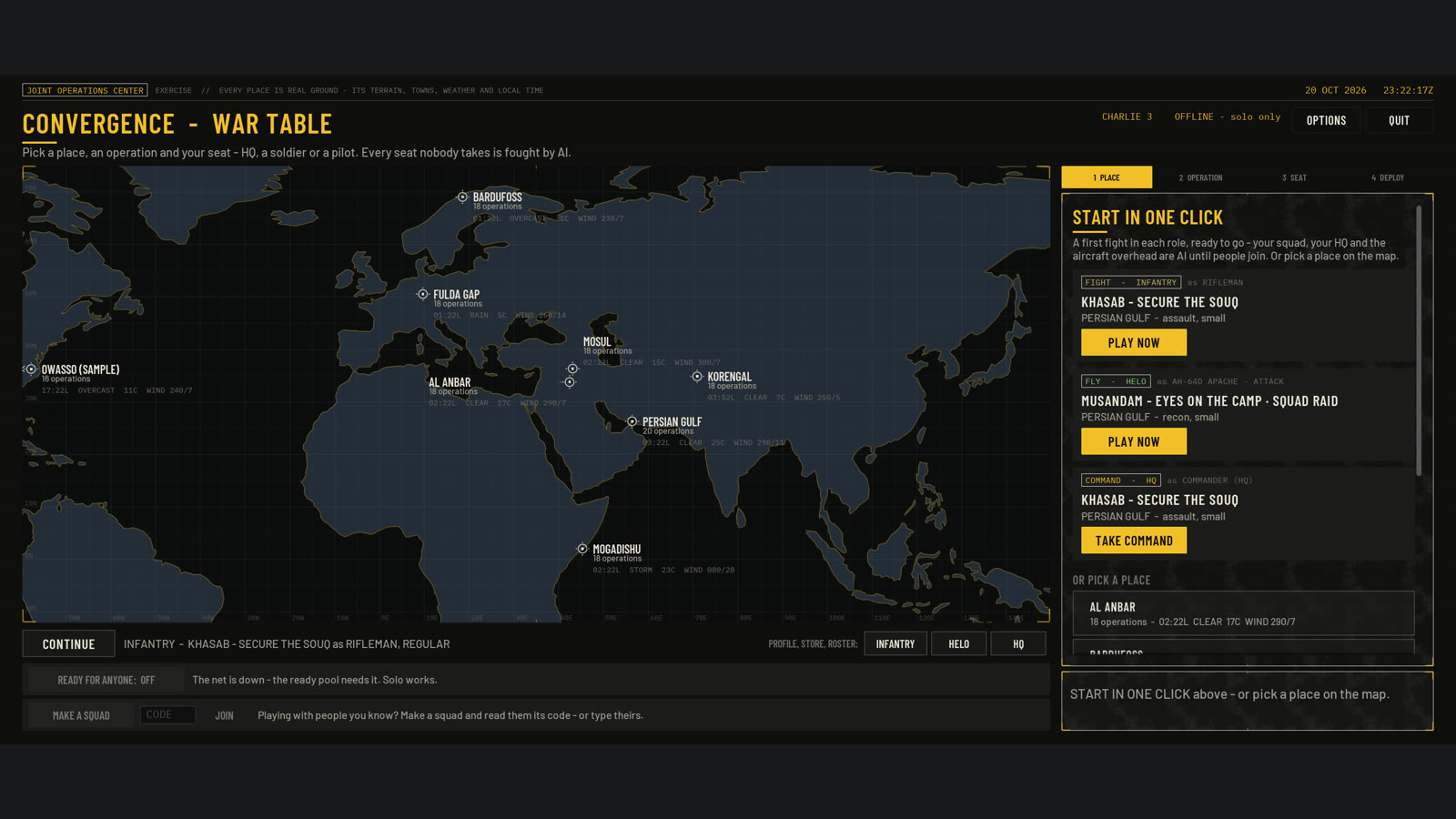
  2. Under START IN ONE CLICK, pick one of the three cards (the roles are explained below): PLAY NOW on the INFANTRY card to fight on foot, PLAY NOW on the HELO card to fly, or TAKE COMMAND on the COMMAND card to run HQ.That's it: you're in.
  3. Want a different place or mission? Pick a place on the map, then an operation, then your seat, then DEPLOY.
The War Table: a world map with the battlefields on the left and START IN ONE CLICK on the right, with a PLAY NOW button for the rifleman and the pilot and TAKE COMMAND for HQ.
The War Table. START IN ONE CLICK is on the right.

03The three roles

Infantry

Rifleman

On foot with a rifle, leading your fireteam. HQ sends you orders over the radio. You take the ground.

First keys
W A S D MouseMove and aim
LMB RMBFire, aim down the sights
FAcknowledge HQ's order
OReport the order done
HSquad: hold / follow me
TAB (hold)Every radio call you can make
MMap
Helo

Pilot

Fly an Apache gunship or a Black Hawk. Fly troops in and out, and hit what's shooting at them.

First keys
EStart the engine
W / SClimb / sink
MouseTilt to fly
A / DTurn the nose
HHold a hover
XShow the way to the objective
JTake a call (a pickup or a strike)
Command

HQ

Run the whole fight from above: watch the drone feed and give the orders to the squads and helicopters.

First moves
Click a unitPick who gets the order
1 to 9, then click the mapGive an order there (1 = ADVANCE, 2 = HOLD)
Or type it"Alpha 2 advance to the souq"
FSpeak an order
EDrone feed full screen
Wheel / RMB dragZoom / move the map

Coming later: armour, jets, naval and drone/intel roles, all on the same battlefield.

04Good to know

Stuck? Press F1

It shows the keys for the role you're playing. Esc pauses and frees the mouse.

Job done

When the objectives are taken, a banner asks: Y extract for a bonus, or N leave now.

Talk

Hold V to talk on the radio. Change keys and the microphone in OPTIONS.

Found a problem?

Press F2 (or use the pause menu) to send a problem report.

All the keys, one printable page per role: the controls sheet.